Monday, March 7, 2011

DUCKDUCKGO!

hey u olls...
today i would like to share
something...
i just found out this thing n i never use this search engine before...
but there is something special that u oll should try this search engine...
that is
DUCKDUCKGO.
Duck Duck Go is a search engine, like Google.
But unlike Google, they respect your privacy and don’t track you.
The results displayed are clear, there is much less spam and ads and much more content.
 Official sites are labeled and displayed on top.
You are able to customize the page — change the fonts and much more.
OK from now on let we make transformation,
from keep using the google....lets we try new search engine...
that is
DUCKDUCKGO.

Saturday, March 5, 2011

Oh!!my keyboard..but how??

What happen with my keyboard??
Did u want to noe??
Come here..
I wanna tell u something!!
I spill a drink on my keyboard!!

What??
How can I do this??
Eit…more relax ok!
I noe what must I do..
I have just read about this
I can have my big SMILE!!
Yeah…my keyboard..

Just turn d keyboard
Upside down on top of a kitchen towel

Leave it alone for a while

Then!!

Wipe the top of the keys down with slightly damp cloth

Now!!

Back in business

Yeay!!

Click picture below to go to the page where I take dis imfrmation!!

Vinegar??cleaning services??

Yeah!!did u know??
vinegar 

can help u to clean up ur dirty
Computer, keyboard and cables!!

y??
Because it provide full range of
T&D Equipment n solutions 4 substation to 750kV

Advantages??
Inexpensive!!
Help prevent dirt from sticking 2 ur things!!

How??
-1st-
Clean with a vacuum cleaner
-2nd-
Sprinkle some vinegar onto a paper towel
-3rd-
Wipe d body of ur computer gently

Where I get dis??
Ahha!!thx  4 dis page!!

Thursday, March 3, 2011

create PARTITION

Hi guys...
we meet again...
Today, i want to show something about different topic and not in our syllabus study...
but just for additional knowledge...
Do you know how to create partition in Windows 7..?

If you dont know, you must read about this topic...
^.^
Do you know why creating a partition is very important..?
actually, it allows you to store your important data, whether in computers or in the external hard disk,
if there any disaster or you need to format your computer...

You just follow these steps & you can get the new partition in your disk...
it is easy...


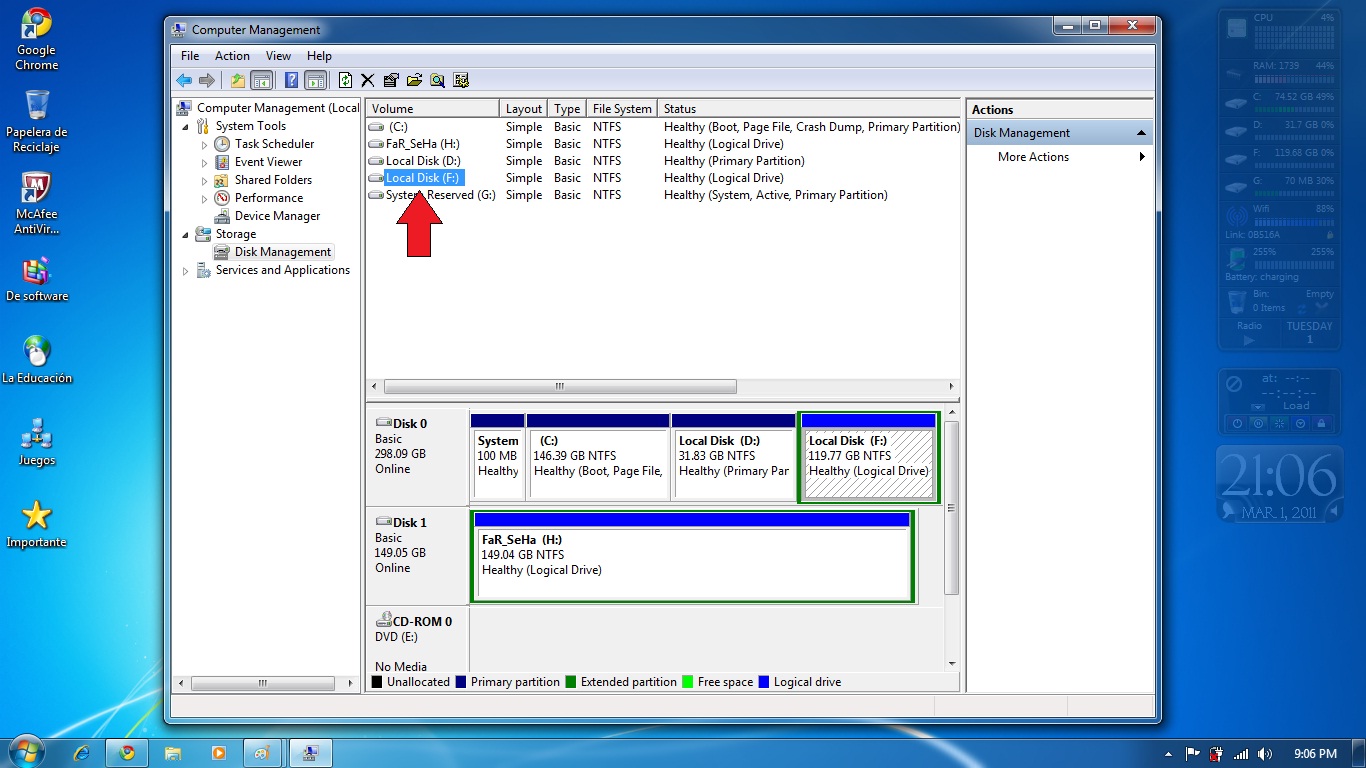
Firstly, you should go to 'Start' button, then right click 'My Computer' & then click 'Manage' option...


Then, you brought to the 'Computer Management' program..


After that, you have to click on the 'Storage' bar & then click on 'Disk Management'...


Next steps is you have to Select the drive which you want to partition...
For example : i will choose my Local Disk (F:)
below the drive list, there has the part or division of your drive space...


Next, you have to right click on the drive & you need to click on 'Shrink Volume' option...
You also can delete the volume if you wont need it...


You can see that the box which present the size of the hard drive & the total volume that available to shrink.
you are require to Enter the amount you would like to shrink (remember that this will be the size for new partition & approx 1000 MB = 1 GB)...


You need wait for a while...
after that, you will see the 'unallocated' space which is the size that just been shrunk...
then you Select it & right click on the 'New Simple Volume' option..


then you just Follow the Wizard that appear and Fill in the Size of the Partition of the drive...
Assign a drive letter so that you can make a difference to other disks....
Remember that you must Ensure NTFS is select on the file system & then Enter the name for your drive...

Lastly, click 'Next' followed by 'Finish'...
The new drive are ready to be use...

Easy rite..?

If you need more help, just click on this smiley (^.^)

Wednesday, March 2, 2011

protect your PC!!!

yuhhuu...
hi alls!!
lets share best topic here..
you know what??
i search and want to know about our PC secure!!


and i find this!!
this very important for us..

secure computer against malware??how to do??
!
v
defenses ur computer
and
not to be tricked into downloading malware

what??defenses computer??but, how??
here some ways to defenses ur lovely computer
~
~
----first----
install antivirus n antispyware prgram from trusted sources
~
~
----second----
update software regularly
~
~
----thirdth----
use strong passwords and keep them secret!!
>include combination of letters, no., symbols<
>DON'T share any password with anyone<
>DON'T used same password on all sites<
~
~
----fourth----
never turn off ur firewall
~
~
----fifth----
use flash drives cautiously


what about downloading malware??
here!!please,please and please!!
~
Be very cautious about opening attachments

Avoid clicking Agree, OK, or I accept easily

Only download software from websites you trust
 
 
^^
..see more here for detail..

Tuesday, March 1, 2011

hackers?

hello my dear frens...
today i would like to share with u all with the thigs that u need to take serius okey...
okey!
mood serius plizz 
=____="

okey? do you know that what is hackers??
let me help u to find the answer for the question....
1

2

3

4

5

tada~


"Hackers are the elite corps of computer designers and programmers. They like to see themselves as the wizards and warriors of tech. Designing software and inventing algorithms can involve bravura intellection, and tinkering with them is as much fun as fiddling with engines. Hackers have their own culture, their own language. And in the off-hours, they can turn their ingenuity to sparring with enemies on the Nets, or to the midnight stroll through systems you should not be able to enter, were you not so very clever. Dark-side hackers, or crackers, slip into systems for the smash-and-grab, but most hackers are in it for the virtuoso ingress.
It's a high-stress life, but it can be amazing fun. Imagine being paid - well paid - to play forever with the toys you love. Imagine."
From St. Jude, Mondo 2000: Users's Guide to the New Edge.


WHAT HACKERS CAN DO TO YOU?
  • Hijack your usernames and passwords
  • Steal your money and open credit card and bank accounts in your name
  • Ruin your credit
  • Request new account Personal Identification Numbers (PINs) or additional credit cards
  • Make purchases
  • Add themselves or an alias that they control as an authorized user so it’s easier to use your credit
  • Obtain cash advances
  • Use and abuse your Social Security number
  • Sell your information to other parties who will use it for illicit or illegal purposes 
 i get it from info!

                               
okey there is several video that i want to share....
but i'm really sorry because i can't upload it.
so i give u oll the links okey?
ONE FOR TIPS!
AND ONE FOR INTERESTING INFO!
and this one is the things that i think it is very interesting n rarely happend


NET???

hi alls!!
meet you here again..
(big smile for you!!)
wokey...come..
i want to share with you about


....net...
did you know what is it mean??
used as an abbreviation of Internet and Intranet 
as Internets and Intranets 
share a lot of similar attributes


INTERNET
This is the world-wide network of computers 
accessible to anyone 
who knows their Internet Protocol (IP) address

INTRANET
network that is not available to the world outside of the Intranet
 internal private computer network or connection of 
one or more computer networks, 
whose use and access is restricted to an organization and its employees


EXTRANET
Intranet that is partially accessible to authorised outsiders
private network that uses 
Internet technology and the public telecommunication system 
to securely share part of a business's information or operations with 
suppliers, vendors, partners, customers, or other businesses


know more, just click here!!